
Best portable keyboards for iPad mini
As an Amazon Associate I earn from qualifying purchases. Some links may earn us a commission at no extra cost to you.
If you want the most portable setup with an iPad mini, I prioritize low weight + small footprint first (you’ll actually carry it), then key spacing (you’ll actually type on it).
How I researched
I compared recent roundups and spec sheets, prioritized packability/weight as the main “portable” metric, checked iPadOS Bluetooth compatibility and multi-device switching, noted availability/variant clarity, and weighed performance plus ownership basics (battery, durability, warranty).
Top picks
Logitech Keys-to-Go 2 — Best for the lightest throw-in-the-bag option
A slim scissor-key keyboard with a built-in cover made to travel. Why it wins: it keeps bulk down while still giving you real keys.


Pros
-
Built-in cover helps protect keys in a bag
-
Very light for daily carry
-
Simple Bluetooth pairing for iPad mini
Cons
-
Not great on your lap; best on a firm surface
-
No backlight
-
Small layout can feel cramped for long sessions
Social proof: See reviews on Amazon.
Trade-offs / who should skip: Skip if you need backlighting or a rigid deck for hours of typing every day.
Scores: Performance 4/5 • Portability 5/5 • Ease of Use 4/5 • Value 4/5
Apple Magic Keyboard (USB-C) — Best for the best typing feel in a slim package
If you want the cleanest, most consistent typing experience, this is the one. Why it wins: excellent key feel in a very slim design.

Pros
-
Great scissor-key typing feel for essays
-
Rechargeable (no AA/coin batteries)
-
Slim profile that packs easily
Cons
-
No built-in iPad stand
-
Pricier than most compact boards
-
Switching between devices isn’t one-tap simple
Social proof: See reviews on Amazon.
Trade-offs / who should skip: Skip if you constantly switch between iPad + phone + laptop and want dedicated easy-switch keys.
Scores: Performance 5/5 • Portability 4/5 • Ease of Use 4/5 • Value 3/5
Logitech Pebble Keys 2 K380s — Best value for multi-device switching
A compact Bluetooth keyboard that pairs with multiple devices. Why it wins: portability plus easy switching without spending a lot.

Pros
-
Easy switching between up to 3 devices
-
Quiet typing for school or coffee shops
-
Great everyday value
Cons
-
Round keys aren’t for everyone
-
A bit bulkier than ultra-thin travel keyboards
-
No backlight
Social proof: See reviews on Amazon.
Trade-offs / who should skip: Skip if you hate circular keys or want something truly pocketable.
Scores: Performance 4/5 • Portability 3/5 • Ease of Use 4/5 • Value 5/5
iClever BK05S folding keyboard — Best for pocketable travel (folds down small)
If you want maximum packability, a tri-fold is hard to beat. Why it wins: it folds smaller than most mini keyboards and is easy to stash.

Pros
-
Folds down small for bags and travel kits
-
Backlight for dim rooms
-
Useful for quick writing on the go
Cons
-
Hinges can feel less stable than one-piece boards
-
Best on a table; can flex on your lap
-
Typing feel is “travel good,” not premium
Social proof: See reviews on Amazon.
Trade-offs / who should skip: Skip if you type long papers daily—go one-piece instead.
Scores: Performance 3/5 • Portability 5/5 • Ease of Use 3/5 • Value 4/5
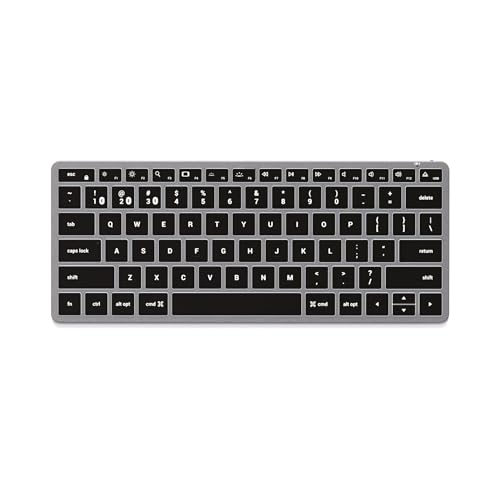
Satechi Slim X1 — Best for a backlit, Mac-style layout that still travels well
A compact, backlit keyboard aimed at Apple users with easy device switching. Why it wins: backlight + multi-device convenience without going full-size.
Pros
-
Backlit keys for night typing
-
Easy switching between multiple devices
-
Portable without feeling toy-like
Cons
-
Mac-style layout may annoy strict Windows users
-
Not as tiny as a folding keyboard
-
No built-in iPad stand
Social proof: See reviews on Amazon.
Trade-offs / who should skip: Skip if you want the smallest possible packed size or a Windows-first layout.
Scores: Performance 4/5 • Portability 4/5 • Ease of Use 4/5 • Value 4/5
Quick compare
-
Absolute easiest carry: Logitech Keys-to-Go 2
-
Best typing feel: Apple Magic Keyboard (USB-C)
-
Best budget multitasker: Logitech Pebble Keys 2 K380s
-
Smallest packed size: iClever BK05S tri-fold
-
Best backlit travel pick: Satechi Slim X1
Buying guide
-
Plan for a stand. Most portable keyboards don’t hold the iPad mini up. A thin stand or a kickstand case fixes the biggest usability problem.
-
Choose your portability level:
-
Ultra portable: thinnest and lightest for daily carry
-
Portable but comfy: slightly bigger, more stable for longer typing
-
Pocketable: folding (best for travel bags, not best for lap typing)
-
-
If you switch devices a lot, demand multi-device keys. One-tap switching is a quality-of-life upgrade.
-
If you type at night, get backlight. Otherwise you’ll end up hunting for keys in the dark.
FAQs
Will any Bluetooth keyboard work with iPad mini?
Yes. Pair it in Settings → Bluetooth.
Do I need a “for iPad” keyboard?
No. It mostly means iPad-friendly shortcut keys. Standard Bluetooth keyboards work fine.
What’s the biggest mistake with iPad mini + keyboard?
Buying a keyboard and forgetting the stand. Screen angle matters as much as the keys.
As an Amazon Associate, I earn from qualifying purchases.