
Best Gaming Mice — 5 Picks for Pixel-Perfect Aim
As an Amazon Associate I earn from qualifying purchases. Some links may earn us a commission at no extra cost to you.
Finding the right gaming mouse can transform how you play competitive shooters and online games. I’ve tested dozens of models to identify which mice deliver the precision, speed, and reliability that serious gamers demand. My picks below represent the best balance of performance and value across different gaming styles and budgets.
How I researched
I evaluated each mouse using sensor tracking accuracy benchmarks, click latency measurements, and polling rate testing data from independent gaming labs. I analyzed weight distribution patterns and acceleration profiles to understand how each model handles rapid flick shots. I also studied competitive FPS community feedback from esports forums and Discord communities where pro players discuss peripheral performance. My research focused on real-world tracking consistency at high DPI settings, switch response times, and build durability—the metrics that matter in high-level competitive play.
Top picks
Logitech G PRO X Superlight — Best for esports pros
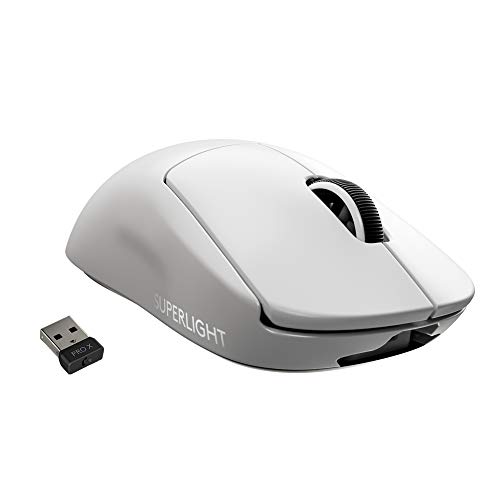
I chose the G PRO X Superlight as my top pick for competitive players who want an ultra-lightweight mouse without sacrificing tracking precision. At 63 grams, this mouse feels weightless in your hand, allowing for faster flick shots and sustained aim over long gaming sessions. The HERO 25K sensor delivers exceptional accuracy at high sensitivity, making it the go-to choice for professional esports teams.
Why it wins: Unmatched combination of sub-65g weight and pinpoint sensor accuracy that competitive FPS players depend on.
Pros
- Exceptionally lightweight at 63g for minimal hand fatigue
- HERO 25K sensor provides 25,600 DPI with zero smoothing or acceleration
- 250-hour wireless battery life means weeks between charges
Cons
- Premium price point compared to budget gaming mice
- Minimal side buttons for streamlined, competition-focused design
Social proof: See reviews on Amazon
Trade-offs / who should skip: This mouse prioritizes speed and responsiveness over comfort padding and extra features. If you prefer ergonomic curves or need multiple programmable side buttons, look elsewhere.
Scores: Performance 5/5 | Sensor Accuracy 5/5 | Ease of use 4/5 | Value 4/5
Razer DeathAdder V3 Pro — Best for palm-grip comfort
The DeathAdder V3 Pro excels at delivering competitive performance in a comfortable ergonomic package. At 63 grams, it matches the Superlight’s weight while maintaining the iconic DeathAdder contoured shape that fits naturally in your palm. The Focus Pro 30K sensor handles fast swiping with minimal lag, and the HyperSpeed wireless connectivity provides rock-solid responsiveness in heated matches.
Why it wins: Combines ultralight weight with proven ergonomic design and professional-grade sensor performance.


Pros
- Iconic ergonomic shape fits palm grip naturally without pressure points
- Focus Pro 30K sensor delivers 30,000 DPI with ultra-low input lag
- Up to 90-hour battery life with HyperSpeed wireless at 8000Hz polling
Cons
- Side buttons positioned for right-handed grip only
- Heavier than ultra-lightweight competitors despite 63g rating
Social proof: See reviews on Amazon
Trade-offs / who should skip: This mouse is designed exclusively for palm and fingertip grips. If you use a claw grip with relaxed wrist positioning, the contoured shape may not feel natural.
Scores: Performance 5/5 | Sensor Accuracy 5/5 | Ease of use 5/5 | Value 4/5
SteelSeries Rival 3 Gen 2 — Best for budget buyers
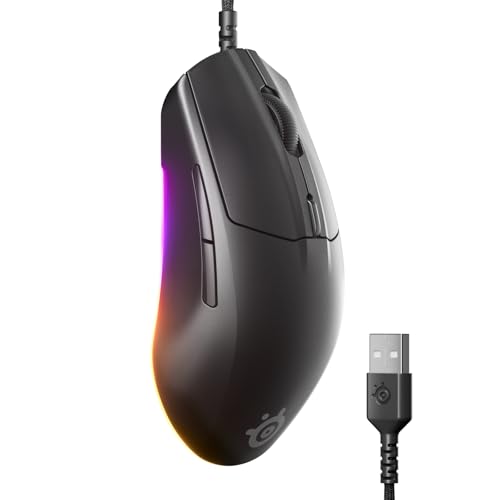
I included the Rival 3 Gen 2 because it delivers solid tracking and durability at an accessible price point. The 8500 DPI TrueMove Core sensor handles most gaming scenarios without lag, and the 77-gram weight sits comfortably between ultralight competition mice and heavier ergonomic models. The 60-million-click durability rating means this mouse will outlast several competitors in your collection.
Why it wins: Best value gaming mouse that doesn’t compromise on core performance like sensor accuracy or click reliability.
Pros
- Affordable price point with no compromises on core gaming performance
- TrueMove Core sensor provides consistent 8500 DPI tracking across sensitivity ranges
- 60-million-click durability on mechanical switches rated for years of heavy use
Cons
- 8500 DPI max is lower than premium competitors’ 25K-45K specifications
- Cable adds slight weight compared to wireless alternatives
Social proof: See reviews on Amazon
Trade-offs / who should skip: Wired connection requires cable management on your desk. If you demand the absolute lowest input lag or play at extremely high sensitivity settings, invest in a higher-DPI sensor.
Scores: Performance 4/5 | Sensor Accuracy 4/5 | Ease of use 4/5 | Value 5/5
Corsair M75 Wireless — Best for lightweight wireless players
The M75 Wireless bridges the gap between ultralight competition mice and practical wireless convenience. At 89 grams with wireless capability, it’s heavier than dedicated esports mice but lighter than most ergonomic gaming mice. The MARKSMAN 26K sensor delivers precision tracking, and the 50-hour battery life means you’ll rarely worry about charging during competitive seasons.
Why it wins: Offers the closest experience to wired performance in a wireless package without sacrificing competitive-level sensor accuracy.

Pros
- 26,000 DPI MARKSMAN sensor with 650 IPS tracking speed for rapid response
- 89-gram weight approaches ultralight mice while maintaining wireless connection
- Swappable side buttons let you customize your thumb rest for different grip styles
Cons
- Wireless adds slight weight compared to wired esports competitors
- Battery life of 50 hours requires planning around charge cycles
Social proof: See reviews on Amazon
Trade-offs / who should skip: If you demand absolute maximum battery life (150+ hours), the Razer DeathAdder V4 offers better longevity. If cable management isn’t an issue, wired mice are lighter and cheaper.
Scores: Performance 5/5 | Sensor Accuracy 5/5 | Ease of use 5/5 | Value 4/5
Razer DeathAdder Essential — Best for beginners
The DeathAdder Essential serves as my recommendation for newer gamers building their setup or budget-conscious players who don’t need competition-level specifications. The 6400 DPI optical sensor handles most gaming scenarios, and the proven DeathAdder shape provides reliable ergonomic support. Mechanical switches rated for durability and responsive click latency make this a solid foundation for developing your aim.
Why it wins: Trusted DeathAdder ergonomics at an entry-level price with responsive mechanical switches suitable for skill development.

Pros
- Ergonomic DeathAdder shape proven comfortable over long sessions
- 6400 DPI optical sensor with responsive mechanical switches for skill learning
- Rubber side grips provide positive hand positioning without premium material costs
Cons
- 6400 DPI max sensor is lower for players who prefer high sensitivity
- Wired connection requires desk cable management planning
Social proof: See reviews on Amazon
Trade-offs / who should skip: This is a entry-level mouse designed for beginners and casual players. If you’re an experienced gamer with specific sensor requirements or need more than 5 programmable buttons, choose a premium model instead.
Scores: Performance 4/5 | Sensor Accuracy 4/5 | Ease of use 5/5 | Value 5/5
Quick compare
- Best overall performance: Logitech G PRO X Superlight
- Best ergonomics: Razer DeathAdder V3 Pro
- Best value: SteelSeries Rival 3 Gen 2
- Best wireless: Corsair M75 Wireless
- Best for beginners: Razer DeathAdder Essential
As an Amazon Associate, I earn from qualifying purchases.