
Best FDM 3D printers for most people (2026)
As an Amazon Associate I earn from qualifying purchases. Some links may earn us a commission at no extra cost to you.
FDM printers got way faster and easier in the last couple years, but the best choice still depends on what you print: big cosplay parts, functional ABS/nylon, or quick PLA prototypes. I picked five that cover the most common “first real printer” use-cases without forcing you into pro-only complexity.
How I researched
I compared recent (last 3–6 months) 3D-printer roundups and deep dives, cross-checked manufacturer spec sheets/manuals, prioritized quality-at-speed (my primary metric), checked enclosure/material fit, noted availability/EOL risk, and weighed ownership costs like parts, tuning time, and support expectations.
Top picks
QIDI Q2 — Best for engineering filaments (hot + heated chamber)
If you want tougher materials (or you’re sick of warping), this is the “serious materials” pick.
Why it wins: 370°C hotend + 65°C heated chamber is a real capability jump.
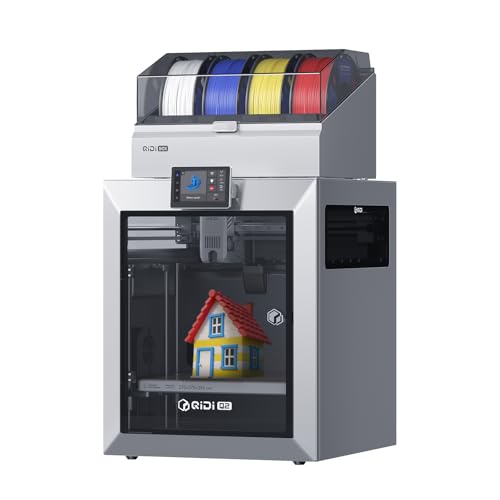
- 【Powerful QIDI BOX】: Unlock multi-colorl, multi-material creations with the QIDI Q2 Combo and its high-performance QIDI BOX. This system enables up to 16-color 3D printing, featuring a dry-while-print system that keeps filaments perfectly dry for smooth, stable results. Built to handle challenging materials like carbon fiber with its hardened steel extruder, it also includes a 65℃ drying chamber, automatic filament reloading, NFC smart settings, and a robust safety system for continuous, worry-free operation.
- 【Exceptional Precision and Stability】: QIDI Q2 Combo nozzle acts as the leveling sensor for unmatched first-layer accuracy, true plug-and-play operation, and insensitivity to bed surface variances. Built on a rigid, full-metal CoreXY structure with precision linear rails, it ensures stable, high-speed motion. This foundation is enhanced by an upgraded 1.5GT synchronous belt, which minimizes vibration artifacts (VFA) to deliver ultra-smooth surface finishes.
- 【professional-grade performance】: The QIDI Q2 Combo ensures professional results with its 2nd-generation 65°C heated chamber—minimizing warping and enhancing layer adhesion—and a 370°C high-temp nozzle that unlocks engineering plastics and composites. Capable of speeds up to 600mm/s and up to 20000 mm/s² acceleration, it delivers strong, precise prototypes and vibrant models. Smart features like auto-leveling, filament detection, AI camera monitoring, and power-loss recovery guarantee consistent, worry-free printing every time.

Pros
-
370°C nozzle temp for high-temp materials (when filament specs allow)
-
Active heated chamber (65°C) for warp-prone prints
-
Max toolhead speed listed at 600 mm/s (great for prototyping runs)
Cons
-
More “machine” than a basic PLA starter
-
Heavier/bulkier than open-frame printers
-
Costs more to feed if you live in engineering filaments
Social proof: See reviews on Amazon.
Trade-offs / Who should skip (failure cases)
-
Skip if you only print PLA and want the simplest workflow.
-
Skip if your space can’t handle an enclosed printer (heat + filtration still needs ventilation planning).
Scores: Performance 4.5/5 • Speed (quality-adjusted) 4.5/5 • Ease of Use 4/5 • Value 4/5
Creality K1C — Best value enclosed CoreXY for fast functional parts
This is the “fast enclosed” value lane: CoreXY speed without “flagship pricing.”
Why it wins: CoreXY platform + up to 600 mm/s class speed.

- Extruder for CF Printing: The all-metal extruder kit ensures a clog-free extrusion for up to 1000 hours. The unified nozzle and heatbreak block heat creep and allow for easy swapping. Meanwhile, the hardened steel nozzle confidently handles carbon fiber-filled filaments like PLA-CF and PETG-CF, known for their strength and dimensional stability.
- Stable at High Speed: K1C can print at speeds up to 600mm/s without vibrations. The sturdy metal frame integrates die-cast parts with fewer seams and joints. The dynamically balanced printhead fans rotate smoothly when cooling the hotend and 3D prints. The G-sensor in the printhead cancels resonance with input shaping, eliminating ringing and ghosting.
- AI-assisted User Experience: K1C comes pre-assembled for easy plug and play. The auto-calibration feature ensures level printing with a single tap. The included AI camera monitors the printing process, actively alerting you to any errors. It's also perfect for monitoring and creating time-lapse videos. Plus, when a print fails in a batch, you can exclude it effortlessly.
Pros
-
Enclosed CoreXY design (helps with ABS/ASA stability vs open-frame)
-
“Up to 600 mm/s” speed class (profiles still matter)
-
Creality store messaging commonly lists ~1-year warranty (region/policy details vary)
Cons
-
Creality ecosystem can require more tuning than “locked” systems
-
Support experience varies by region/seller
-
Enclosed doesn’t automatically mean “no fumes”
Social proof: See reviews on Amazon.
Trade-offs / Who should skip (failure cases)
-
Skip if you want the least tinkering possible (some profiles/mods may be part of ownership).
-
Skip if you need super-consistent multi-material workflow out of the box.
Scores: Performance 4/5 • Speed (quality-adjusted) 4.5/5 • Ease of Use 3.5/5 • Value 4.5/5
ELEGOO Neptune 4 Max — Best for big prints on a budget (huge build volume)
If you want helmets, props, large terrain, or “print it in one piece,” build volume wins.
Why it wins: 420 × 420 × 480 mm is enormous for the category.
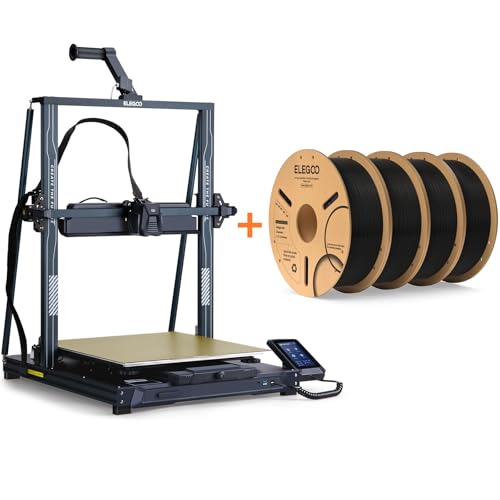
- LIGHTNING-FAST 500MM/S PRINTING: Powered by Klipper firmware, Neptune 4 Max reaches speeds up to 500mm/s (default 250mm/s) and 8000mm/s² acceleration. Ideal for use with rapid filament in high-speed mode
- MASSIVE BUILD VOLUME: Spacious 16.53”x16.53”x18.89”/420x420x480mm build area for large models or multiple smaller prints. For high-temp filaments or prints over 300x300mm, bed clips are highly recommended to prevent bed shifting
- PRECISION & QUALITY: Input shaping, pressure advance, and X/Y axis acceleration sensors ensure reduced vibration and enhanced printing accuracy for detailed, high-quality, fast prints
Pros
-
Massive build volume for cosplay/large parts
-
Listed max speed up to 500 mm/s (real-world depends on model/filament)
-
Auto-leveling (121-point) is a must at this bed size
Cons
-
Takes real space (and a sturdy table)
-
Big beds demand patience dialing first layers
-
Not enclosed (ABS/ASA large prints can be tougher)
Social proof: See reviews on Amazon.
Trade-offs / Who should skip (failure cases)
-
Skip if you mostly print small parts—this is overkill.
-
Skip if you need ABS/ASA reliability more than size (an enclosed heated-chamber printer fits better).
Scores: Performance 4/5 • Speed (quality-adjusted) 4/5 • Ease of Use 3.5/5 • Value 4.5/5
Creality Ender-3 V3 KE — Best budget “fast enough” starter
This is my “start here if you’re price-sensitive but still want modern speed features.”
Why it wins: strong feature-per-dollar vibe with 500 mm/s max class specs.

- FASTER INTUITIVE PRINTING EXPERIENCE: Creality Ender 3 V3 KE 3d printer can print at up to speed 500 millimeter per second with acceleration 8000 millimeters per square second, faster than most of printers on the market. You can complete models efficiently, saving time to wait for print jobs. Moreover, it can keep good printing quality at the same time. Responsive touch UI screen with an intuitive tab bar, real-time model preview and vivid motion graphics of printing parameters
- "SPRITE" DIRECT EXTRUDER: 60W ceramic heater, Bi-metal heatbreak and copper nozzle enable 300 degree printing. The "Sprite" Direct Extruder of Ender 3 V3 KE enables smooth feeding of various filaments, including PLA, PETG, ABS, TPU and ASA filaments. And the extruder is market-proven for its reliability, as over 500,000 units have been shipped worldwide
- ULTRA-SMOOTH MOTION AND STABLE STRUCTURE: The stiff steel linear rail on the X-axis has a carriage slide containing ball bearings, which can move smoothly, accurately and steadily. Built out of stiff steel, it will stay as new even after long-time use. The rigid dual Z-axis lead screws reduce Z wobbling effectively, and the Y-axis features two 8 mm linear sharts made of strong and wear-proof steel
Pros
-
High advertised max speed (500 mm/s) for quick PLA runs
-
Huge community footprint (Ender ecosystem)
-
Good “learn the hobby” platform without jumping to pro pricing
Cons
-
Open-frame = more drafts/temp sensitivity
-
You’ll likely spend more time tuning than with premium ecosystems
-
Upgrade temptation is real
Social proof: See reviews on Amazon.
Trade-offs / Who should skip (failure cases)
-
Skip if you want zero tinkering—paying more can buy time back.
-
Skip if ABS/ASA is your primary plan (enclosure matters).
Scores: Performance 3.5/5 • Speed (quality-adjusted) 4/5 • Ease of Use 3.5/5 • Value 5/5
Quick compare
-
Least tinkering: Bambu Lab A1
-
Best for ABS/nylon/engineering: QIDI Q2
-
Best enclosed value: Creality K1C
-
Best for huge prints: ELEGOO Neptune 4 Max
-
Best on a tight budget: Ender-3 V3 KE
FAQs
Is CoreXY always better than a bed-slinger?
Not always. CoreXY often helps at higher speeds, but a well-supported bed-slinger can be simpler, cheaper, and still very fast for PLA.
Do I “need” an enclosure?
If you print mostly PLA/PETG: no.
If you print ABS/ASA/nylon: it’s often the difference between “warps constantly” and “works.” The QIDI Q2 is built specifically around that idea.
Are 500–600 mm/s claims real?
They’re usually “max” figures. You’ll see the benefit most on travel-heavy prints and well-tuned profiles; tiny detailed parts may still need slower settings for clean edges.
What filament should I start with?
PLA is the easiest. Once your first layers and temps are consistent, then try PETG. Save ABS/ASA/nylon for when you either have an enclosure or you’re ready to troubleshoot warping.
As an Amazon Associate, I earn from qualifying purchases.