
Best Cheap 3D Printers for Beginners
As an Amazon Associate I earn from qualifying purchases. Some links may earn us a commission at no extra cost to you.
Getting into 3D printing doesn’t have to be expensive or super technical. At the “cheap” end of the market, what really matters is print quality, ease of setup, auto-leveling, reliability, and build volume. Fancy extras are nice, but not essential for your first machine.
Below are five budget-friendly printers I’d actually feel comfortable recommending to a first-timer or hobbyist.
Top picks
Creality Ender-3 V3 SE — Best cheap 3D printer for most people
A fast, beginner-friendly FDM printer with auto-leveling and a “just works” reputation for the price.
Why it wins: It’s widely recommended as one of the best budget FDM 3D printers thanks to its clean print quality, 220 × 220 × 250 mm build volume, and automatic bed leveling at a very approachable price. It also fits into the huge “Ender” ecosystem, which means tons of community help and upgrades.
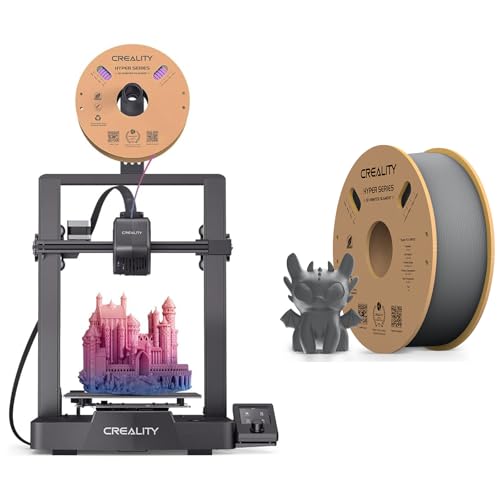
- 【250MM/S HIGH PRINT SPEED】The Creality Ender-3 V3 SE 3d printers for home use desktop boasts a maximum print speed of 250mm/s, allowing it to complete prints significantly faster than many other budget 3D printers. This rapid printing capability reduces overall print time, making it an efficient choice for users seeking quick results. Whether you're working on large projects or producing multiple items, the Ender-3 V3 SE's high print speed enhances productivity and turnaround times, making it a
- 【CR-TOUCH SENSOR AUTO-LEVELING】Creality Ender 3 V3 SE 3d printer is equipped with an auto-leveling feature, which is a significant advantage for 3D printing. This feature ensures precise bed calibration by automatically adjusting the print bed to the correct level before each print job.
- 【DIRECT DRIVE EXTRUDER】Direct Drive Extruders of Creality ender 3 v3 SE 3d printers offer precise filament control close to the hotend, improving print quality and reducing extrusion issues. They support various filaments without Bowden tubes, minimizing jams. Stringing and oozing are reduced, leading to cleaner prints. Accurate retraction control prevents filament leakage. Small details are printed with precision, and support materials are handled efficiently. Flexible filaments like TPU are pr
Pros
-
Auto-leveling + auto Z-offset make setup beginner-friendly
-
250 mm/s max speed is quick for a budget machine
-
Decent 220 × 220 × 250 mm build volume for most projects
-
Direct-drive extruder handles flexible filaments better than old Enders
Cons
-
Open-frame design; not ideal for ABS without enclosure
-
No Wi-Fi; prints from SD card or USB only
-
Fans can be noticeable in a quiet bedroom
Social proof
Owners often mention that the Ender-3 V3 SE prints well right out of the box, with first prints succeeding using the sample PLA and only minor tweaks. The huge Ender community also makes it easier to find profiles, fixes, and printable upgrades. See reviews on Amazon for long-term reliability impressions.
Trade-offs / Who should skip
This is a great starter if you want cheap, FDM, and upgradable. If you know you’ll print mostly ABS/nylon and need an enclosed chamber, or you specifically want Wi-Fi/cloud control and more automation, you may be happier with something like a higher-end enclosed printer or a more “appliance-like” ecosystem.
Scores: Performance 4.5/5 · Print Quality 4.5/5 · Ease of Use 4.5/5 · Value 5/5
ELEGOO Neptune 4 — Best cheap high-speed 3D printer
A very fast budget FDM printer with Klipper firmware and a surprisingly rich feature set.
Why it wins: For “entry-level” money, you get Klipper-powered speeds, dual-gear direct drive, auto-leveling, and a heated PEI plate. It’s built to print much faster than classic budget printers while still keeping strong print quality once tuned.
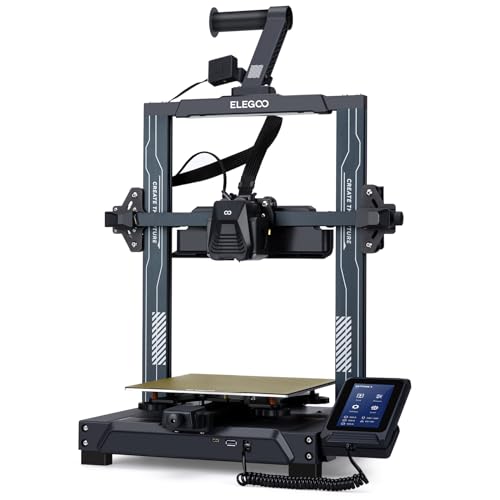
- 500MM/S LIGHTNING-FAST SPEED: With Klipper firmware onboard, ELEGOO Neptune 4 pro achieves an astonishing maximum printing speed of 500mm/s with 20000mm/s²acceleration. Save you time on your printing tasks! Recommended printing speed is 250mm/s
- GREATLY IMPROVED PERFORMANCE: Neptune 4 boasts an ARM 64-bit 1.5GHz quad-core high-performance processor, for fast, stable, and precise printing. Intelligent input shaping and pressure advance function minimize vibration effects and enable precise flow control, greatly improved print quality
- POWERFUL DIRECT EXTRUDER: Self-developed dual-gear direct drive extruder boasts a 5.2:1 reduction ratio, providing powerful extrusion and smoother filament feeding. Combined with metal throat pipe and innovative air duct design, it minimizes the risk of nozzle clogging
Pros
-
Klipper firmware with high-speed printing up to 500 mm/s
-
Direct-drive extruder handles PLA, PETG, TPU, more
-
Auto-leveling across many points improves first-layer success
-
Bigger build volume than many budget printers
Cons
-
High-speed printing needs tuning to avoid ringing
-
Firmware and UI feel more “techy” than kid-friendly
-
Open frame; enclosure needed for certain materials
Social proof
Enthusiasts praise the Neptune 4’s raw speed and feature set for the money, often comparing it to more expensive printers when tuned correctly. Some users do mention a learning curve with Klipper and high-speed profiles, so it’s better for someone willing to tweak settings. See reviews on Amazon for real-world tuning tips and owner photos.
Trade-offs / Who should skip
If you’re willing to tweak profiles and want crazy speed on a budget, this is a fantastic pick. If you’d rather never think about firmware, Klipper, or advanced settings and just hit “print,” the Creality Ender-3 V3 SE or Bambu A1 Mini will feel more straightforward.
Scores: Performance 4.5/5 · Print Quality 4/5 · Ease of Use 3.5/5 · Value 4.5/5
Bambu Lab A1 Mini — Best compact / “apartment-friendly” cheap 3D printer
A small, modern, almost plug-and-play printer with optional multi-color support.
Why it wins: It brings high-end features (auto-calibration, fast printing, smart flow control, quiet operation) into a compact, beginner-friendly package, and can do multi-color with an add-on. It’s one of the few budget-friendly machines that truly feels like a “just works” appliance.
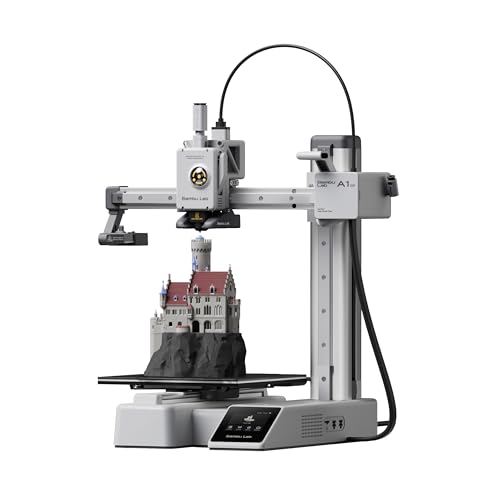
- High-Speed Precision: Experience unparalleled speed and precision with the Bambu Lab A1 Mini 3D Printer. With an impressive acceleration of 10,000 mm/s², the A1 Mini delivers blazing-fast printing while maintaining exceptional accuracy and detail in your prints.
- Multi-Color Printing with AMS lite: Unlock your creativity with vibrant and multi-colored 3D prints. The Bambu Lab A1 Mini 3D printers make multi-color printing accessible and reliable for everyone, bringing your designs to life in stunning detail. Note: AMS lite required, get A1 Mini Combo or buy AMS lite seperately.
- Full-Auto Calibration: Say goodbye to manual calibration hassles. The A1 Mini 3D printer takes care of all the calibration processes automatically, ensuring optimal performance for every print. Enjoy a seamless printing experience with precise Z-offset, bed-leveling, and more.
Pros
-
Almost fully automated setup and calibration sequence
-
Very fast printing for a small machine (high acceleration)
-
Optional AMS lite gives easy multi-color printing later
-
Quiet enough for desks and bedrooms
Cons
-
Smaller build volume; not ideal for big cosplay parts
-
Ecosystem-centric; best experience with Bambu software
-
Replacement parts/accessories can be brand-premium
Social proof
Reviewers highlight how approachable it feels for a first printer and how good the prints look even at higher speeds. Many owners specifically mention loving the quiet operation and the polished app/software experience. See reviews on Amazon for up-to-date impressions and sample prints.
Trade-offs / Who should skip
Choose this if you want something that just works, lives on a desk, and doesn’t sound like a jet engine, and you’re okay with a smaller build area and using Bambu’s software ecosystem. If you’re more into tinkering, swapping parts, and printing very large objects, an Ender-class or Neptune-class printer will scale better.
Scores: Performance 4.5/5 · Print Quality 4.5/5 · Ease of Use 5/5 · Value 4/5
Anycubic Kobra 2 — Best cheap printer for speed on a tight budget
A fast, auto-leveling FDM printer that aims to deliver big-machine speed for starter money.
Why it wins: The Kobra 2 line is built around faster motion plus LeviQ auto-leveling and mostly pre-installed hardware, so you spend more time printing and less time assembling. It’s a nice middle ground for people who care about speed but still want something reasonably beginner-friendly.
No products found.
Pros
-
Much faster than classic “slow Ender”-style machines
-
LeviQ 2.0 auto-leveling simplifies first-layer setup
-
Pre-installed components; basic assembly is quick
-
Good build volume for functional prints and cosplay bits
Cons
-
Firmware and reliability updates still evolving
-
High-speed settings can magnify ringing/quality issues
-
Ecosystem and software feel less polished than Bambu
Social proof
Owners often praise the Kobra 2’s speed and value when used for simple, single-color prints, but note that firmware updates and tuning profiles can make a big difference in consistency. See reviews on Amazon for current experiences and any recurring quirks.
Trade-offs / Who should skip
This is a solid choice if you’re budget-conscious, okay with a bit of tinkering, and want noticeably faster prints than older budget models. If you’d rather sacrifice some speed for a more “set it and forget it” feel, the Ender-3 V3 SE or Bambu A1 Mini are safer picks.
Scores: Performance 4/5 · Print Quality 3.5/5 · Ease of Use 3.5/5 · Value 4.5/5
Anycubic Photon Mono 2 — Best cheap resin 3D printer
A compact, high-resolution resin printer that’s especially good for miniatures and detailed models.
Why it wins: If you care more about insane detail than big build volume, this little resin machine offers a 4K+ mono LCD, upgraded light engine, and beginner-friendly software at a budget price. It’s ideal for tabletop minis, jewelry, and tiny parts where sharp details matter.

- ANYCUBIC Photon Mono 2
Pros
-
4K+ mono LCD for very sharp details on minis
-
Upgraded “LighTurbo” light source reduces layer lines
-
Beginner-friendly slicer with simplified interface included
-
Great choice for figurines, jewelry, and tiny parts
Cons
-
Resin is messier and smellier than filament; needs care
-
Smaller volume; not for large cosplay or props
-
Requires safety gear and good ventilation
Social proof
It’s frequently recommended as one of the best budget resin printers for beginners, especially for tabletop miniatures and other detailed models. Users praise the balance of print quality and ease of use, as well as the compact footprint. See reviews on Amazon for owner prints and workflow tips.
Trade-offs / Who should skip
Get this if your priority is detail over size (figures, minis, jewelry, model parts) and you’re okay dealing with resin handling, gloves, and ventilation. If you just want simple, less-mess printing for practical items, an FDM printer like the Ender-3 V3 SE or Neptune 4 is a better first choice.
Scores: Performance 4.5/5 · Print Quality 5/5 · Ease of Use 3.5/5 · Value 4.5/5
Quick compare
-
Ender-3 V3 SE — Best for most beginners: Great balance of print quality, auto-leveling, and build volume; open frame and no Wi-Fi are the main trade-offs.
-
ELEGOO Neptune 4 — Best for speed + features: Klipper, high-speed printing, and strong hardware; expects some tuning and is less “kid simple.”
-
Bambu Lab A1 Mini — Best compact & quiet: Very easy, fast, and quiet with optional multi-color; smaller build area and more brand-locked ecosystem.
-
Anycubic Kobra 2 — Best for speed on a tight budget: Fast and capable with auto-leveling; firmware polish and tuning matter more here.
-
Anycubic Photon Mono 2 — Best cheap resin: Amazing detail for minis and models; resin workflow is messier and more safety-intensive than filament.
FAQs
Q: What does “cheap” actually mean here?
A: I’m focusing on entry-level 3D printers that are significantly below flagship pricing, yet still widely regarded as reliable and safe for home use. I’m skipping ultra-cheap, no-name machines that get poor reviews or have questionable safety and support.
Q: Which cheap 3D printer is easiest for a complete beginner?
A: In terms of pure ease-of-use, Bambu Lab A1 Mini is the most “console-like”: auto-calibration, smart software, and a guided setup. The Creality Ender-3 V3 SE is next — a bit more hands-on but still very approachable with auto-leveling and a friendly interface.
Q: Is resin 3D printing safe for home use?
A: Resin printing can be done safely at home, but it needs more care than filament. You should:
-
Use gloves and avoid skin contact with uncured resin
-
Work in a well-ventilated space
-
Follow the resin manufacturer’s safety instructions
-
Properly cure and dispose of resin according to local rules
If you don’t want to deal with that, go with an FDM printer instead.
Q: What else do I need to budget for besides the printer?
A: At minimum:
-
For FDM: A roll or two of PLA, a few basic hand tools, side cutters, and maybe a scraper or spatula.
-
For resin: Resin, isopropyl alcohol or wash solution, gloves, paper towels, and ideally a wash-and-cure station.
None of this has to be fancy, but you do need something to handle cleaning, post-processing, and general maintenance.
As an Amazon Associate, I earn from qualifying purchases.