
Best 3D Printers for Beginners (Easy Setup, Reliable First Prints)
As an Amazon Associate I earn from qualifying purchases. Some links may earn us a commission at no extra cost to you.
If you’re brand-new, I’d prioritize reliable auto-leveling, easy first-setup, and a useful build volume (so you don’t outgrow it fast). Below are five beginner-friendly picks that balance “it just works” with parts/support you can actually live with.
Top picks
FLASHFORGE Adventurer 5M — Best for the easiest “set it up and print” start
A beginner-friendly machine built to reduce early frustration, with one-click leveling and a practical 220×220×220 mm build area (per manufacturer specs).
Why it wins: It leans into “low setup drama” while keeping a standard bed size that fits most starter projects.

- 【Succeed with a Perfect First Layer】Full-auto one-click leveling calibrates and levels the bed properly, making you a perfect first layer for every 3D print. It provides accurate and smooth surface to achieve quality printing performance.
- 【Ultra-Fast and Exceptional Quality】Core XY up to 20000 mm/s² Acceleration, Maximum speed 600mm/s, the acceleration from zero to 600 mm/s takes just 0.025 seconds. From unboxing to starting printing, Only 10mins, Enjoy happy printing every day and great all-around quality.
- 【Vibration Compensation&Less Waiting Time】Vibration compensation, eliminating ghosting in prints. Nozzle with a flow of 32mm³/s, 50w heating power, 200℃ heating up in 35 seconds. Precise and consistent extrusion for smooth and no-blur prints.
Pros
-
One-click auto leveling for simpler first setup
-
Standard-size build area for most starter prints
-
Typically a smoother on-ramp than “tinker-first” models
Cons
-
Open-frame printing can be draft-sensitive (a simple enclosure helps)
-
You’ll still learn basic slicing settings over time
Social proof: See reviews on Amazon.
Trade-offs / Who should skip: If you plan to print ABS/ASA a lot, I’d skip open-frame and go enclosed. If you want a bigger-than-standard build area, pick a larger-format option instead.
Scores: Performance 4/5 • Build volume 4/5 • Ease of use 5/5 • Value 4/5
Creality Ender-3 V3 SE — Best for value on a real build size
A “classic first printer” style pick with a 220×220×250 mm build volume (per manufacturer specs).
Why it wins: It gives you a lot of practical printing capacity without jumping into pricier prosumer territory.
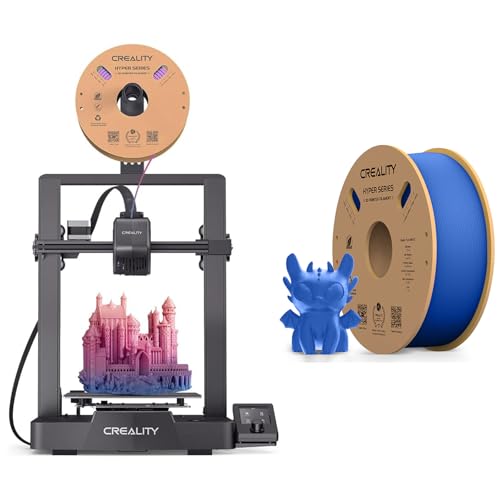
- 【250MM/S HIGH PRINT SPEED】The Creality Ender-3 V3 SE 3d printers for home use desktop boasts a maximum print speed of 250mm/s, allowing it to complete prints significantly faster than many other budget 3D printers. This rapid printing capability reduces overall print time, making it an efficient choice for users seeking quick results. Whether you're working on large projects or producing multiple items, the Ender-3 V3 SE's high print speed enhances productivity and turnaround times, making it a
- 【CR-TOUCH SENSOR AUTO-LEVELING】Creality Ender 3 V3 SE 3d printer is equipped with an auto-leveling feature, which is a significant advantage for 3D printing. This feature ensures precise bed calibration by automatically adjusting the print bed to the correct level before each print job.
- 【DIRECT DRIVE EXTRUDER】Direct Drive Extruders of Creality ender 3 v3 SE 3d printers offer precise filament control close to the hotend, improving print quality and reducing extrusion issues. They support various filaments without Bowden tubes, minimizing jams. Stringing and oozing are reduced, leading to cleaner prints. Accurate retraction control prevents filament leakage. Small details are printed with precision, and support materials are handled efficiently. Flexible filaments like TPU are pr
Pros
-
Useful build volume so you outgrow it slower
-
Auto-leveling features aimed at reducing calibration hassle
-
Huge ecosystem of community tips and accessories
Cons
-
More “tinker tolerance” than the simplest picks
-
Open frame = more sensitive to drafts and room temp swings
Social proof: See reviews on Amazon.
Trade-offs / Who should skip: If you want the least fuss possible (minimal tuning), I’d lean toward a more streamlined beginner model or an enclosed printer.
Scores: Performance 3.5/5 • Build volume 4.5/5 • Ease of use 3.5/5 • Value 5/5
Creality K1 — Best for beginners who want an enclosed, faster CoreXY-style machine
An enclosed printer with a 220×220×250 mm build volume (per manufacturer specs).
Why it wins: The enclosure helps with drafts and consistency, and the CoreXY-style design can feel more “appliance-like” once dialed in.
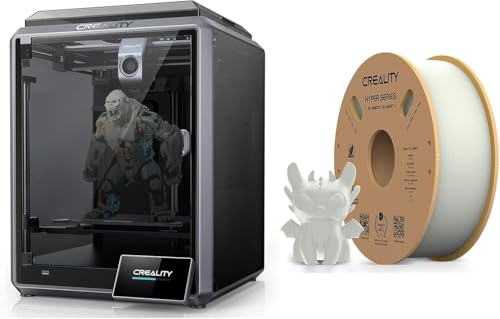
- SPEEDY TO REALIZE CREATIVE IDEAS: The Creality K1 fastest 3d printer desktop boasts remarkable speed, hitting 600mm/s with upgraded motion for 2000mm/s² acceleration and 250mm/s (5x) print speed. High-precision stepper motors drive each axis, with a steel shaft connecting Y-axis belts. Its high-torque 42-48 motor ensures lightning-fast, precise printing, rivaling Bambu Lab P1P. The K1 is an attractive choice for swift and efficient printing.
- HIGHER EFFICIENCY AND MORE ECO-FRIENDLY: The Creality K1 all-in-one 3d printers excels in efficiency and eco-friendliness, cutting print times with its 600mm/s speed. Enhanced productivity and quicker project completion result from this efficiency boost. Moreover, the K1's lower power consumption aligns with its eco-friendly design, offering a faster and greener 3D printing experience.
- STAND FIRMLY TO PRINT QUALITY MODELS: The Creality K1 3d printers for homeuse boasts a robust all-metal cube frame and classic Cartesian structure, ensuring steadfast stability for premium 3D printing. Thick linear shafts, gussets, cantilevers, and silicone bed mounts enhance stability by reducing vibrations, guaranteeing precise, detailed, and dimensionally accurate prints. The K1's solid construction yields top-notch model quality
Pros
-
Enclosed build helps with drafts and cleaner operation
-
Standard build size fits most beginner-to-intermediate projects
-
Good fit if you want “faster printing” potential later
Cons
-
More machine than a basic starter (space + upkeep)
-
Speed can punish poor filament/settings (start with PLA)
Social proof: See reviews on Amazon.
Trade-offs / Who should skip: If you’re only printing PLA in a stable room and want the simplest workflow, an open-frame beginner printer may be easier to live with.
Scores: Performance 4.5/5 • Build volume 4.5/5 • Ease of use 4/5 • Value 3.5/5
Anycubic Kobra 2 Neo — Best for tight spaces and quick assembly
A beginner-leaning bedslinger with auto-leveling and a reasonable mid-size build volume (per manufacturer specs).
Why it wins: It’s positioned to reduce assembly and leveling pain while keeping the basics that matter for early wins.

- 【5X High-Speed】More than 65% shorter time when printing the same model. The Maximum Print Speed is 250mm/s. Recommended print speed is 150mm/s ensures a perfect blend of precision and performance, empowering you to bring your ideas to life with unparalleled speed and accuracy.
- 【New Integrated Extruder】The newly upgraded extrusion system and cooling system melt filaments quickly through the 60W hot end. At the same time, it is equipped with a 7000 rpm cooling fan to ensure rapid cooling and molding of the model.
- 【Details Even Better】Apply the linear propulsion and input shaping functions in Marlin firmware to reduce spillage and print resonance, improve print quality and stability, and create smoother and clearer model details. Novices can also produce high-quality works for their first print.
Pros
-
Auto-leveling helps reduce first-layer frustration
-
Solid “starter” build volume for everyday prints
-
Often a straightforward setup path for beginners
Cons
-
Open frame is draft-sensitive (avoid cold airflow)
-
Tuning still matters for fast or tall prints
Social proof: See reviews on Amazon.
Trade-offs / Who should skip: If you want maximum build volume, I’d look at larger-format printers—just know they’re harder for true beginners to dial in.
Scores: Performance 3.5/5 • Build volume 4/5 • Ease of use 4/5 • Value 4.5/5
Original Prusa MINI+ (kit) — Best for long-term reliability and support culture
A smaller-volume printer with a strong documentation/support ecosystem; build volume is 180×180×180 mm (per manufacturer specs).
Why it wins: If you value proven documentation and long-term ownership confidence over raw size, this is a “buy once, keep it” style pick.
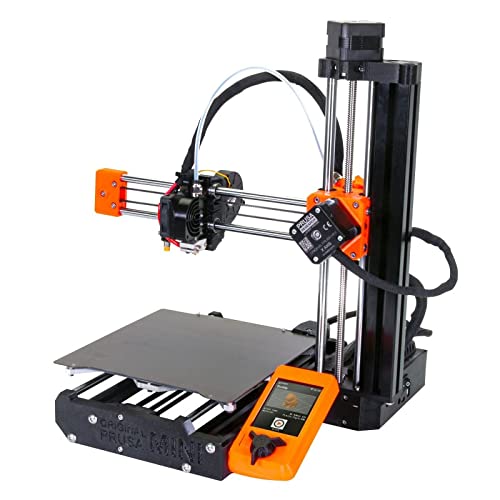
- Original Prusa MINI+ Filament sensor & Spring Steel Sheet With Smooth Double-sided PEI Black-Orange Color
- Black & Orange Color
- Fillement Sensor
Pros
-
Excellent documentation and community help
-
Great choice if you want fewer mysteries over time
-
Strong fit for small functional parts and prototypes
Cons
-
Smaller build volume (you’ll split larger prints)
-
Kit assembly isn’t for everyone (set aside time)
Social proof: See reviews on Amazon.
Trade-offs / Who should skip: If you want large cosplay parts in fewer pieces, I’d choose a standard 220×220×250-ish printer instead.
Scores: Performance 4/5 • Build volume 3/5 • Ease of use 4/5 • Value 3.5/5
Quick compare
-
Most beginner-proof workflow: FLASHFORGE Adventurer 5M
-
Best value “classic” starter: Ender-3 V3 SE
-
Best enclosed pick (draft control): Creality K1
-
Best compact + simple setup angle: Anycubic Kobra 2 Neo
-
Best “keep it for years” support vibe: Prusa MINI+
FAQs
Which is the easiest beginner printer here?
For the most “unbox → level → print” vibe, I’d start with the Adventurer 5M because it’s built around simplified leveling and onboarding.
Do I need an enclosure as a beginner?
Not always. If you’re mostly printing PLA in a room without cold drafts, open-frame is fine. If your room is chilly/drafty (or you want a tidier setup), an enclosed printer like the K1 can help.
Should I start with resin instead of filament (FDM)?
For most beginners, I’d start with FDM. Resin can do amazing detail, but it adds extra handling/cleanup steps and more planning for your workspace.
What filament should I start with?
Start with PLA. It’s typically the easiest path to consistent early wins. Once you’re getting reliable results, then branch out.
As an Amazon Associate, I earn from qualifying purchases.