
Best Vertical Mouse — 5 Ergonomic Picks That Saved My Wrist
As an Amazon Associate, I earn from qualifying purchases. Some links may earn us a commission at no extra cost to you.
A vertical mouse can make long computer sessions feel more natural by keeping your hand in more of a handshake-style position instead of forcing your wrist flat against the desk. It will not magically fix every wrist or forearm issue, but the right ergonomic mouse can reduce awkward posture and make daily clicking, scrolling, and browsing feel more comfortable. These picks focus on vertical mice and ergonomic alternatives for office work, laptop use, large hands, left-handed users, and budget setups.
1. ProtoArc EM11 NL Wireless Ergonomic Vertical Mouse
The ProtoArc EM11 NL is the best overall replacement pick because it offers a true vertical design, modern wireless connectivity, and a practical rechargeable setup. Its 58-degree shape supports a more natural wrist posture, while Bluetooth and 2.4GHz connectivity make it easier to use across multiple devices. It is a strong choice for desk workers who want an ergonomic mouse without jumping into premium pricing.
No products found.
Pros
-
58-degree vertical design supports a more natural hand position
-
Connects to multiple devices with Bluetooth and 2.4GHz wireless
-
USB-C rechargeable battery avoids disposable batteries
Cons
-
Shape may take a few days to get used to
-
Not as premium-feeling as high-end Logitech models
Who should buy it: Choose this if you want the best all-around vertical mouse replacement with modern wireless features.
2. Logitech Lift Vertical Ergonomic Mouse
The Logitech Lift is the best pick for small to medium hands. It gives you a compact vertical shape that feels easier to control than many larger ergonomic mice, especially if bulky vertical models feel awkward. Quiet clicks and simple wireless connectivity make it a good option for home offices, shared spaces, and everyday laptop work.

Pros
-
Compact vertical design works well for small to medium hands
-
Quiet clicks are useful in shared spaces
-
Easy wireless setup for everyday office use
Cons
-
May feel too small for larger hands
-
Fewer advanced controls than bigger productivity mice
Who should buy it: Choose this if you want a comfortable vertical mouse for smaller hands and quiet daily use.
3. Evoluent VerticalMouse
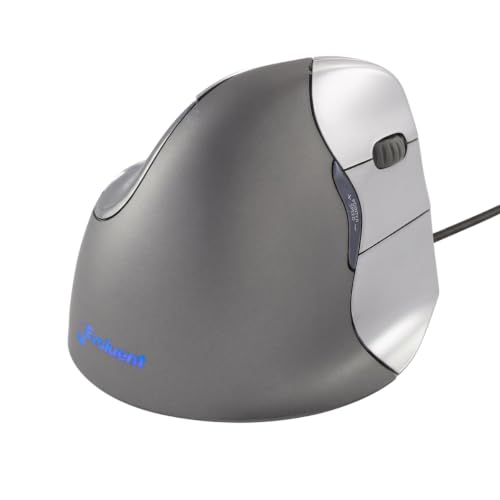
The Evoluent VerticalMouse is a classic option for people who want a more established ergonomic design. It has a taller sculpted shape, wired reliability, multiple speed settings, and customizable buttons for Windows users. It is best for people who prefer a more structured hand position and do not mind using a wired mouse at a fixed workstation.
Pros
-
Tall sculpted shape encourages a more upright hand position
-
Wired connection avoids charging and battery management
-
Customizable buttons are useful for repetitive workflows
Cons
-
Wired design limits desk flexibility
-
Older design feels less modern than newer wireless mice
Who should buy it: Choose this if you want a classic wired vertical mouse for a dedicated desk setup.
4. J-Tech Digital Wireless Ergonomic Mouse
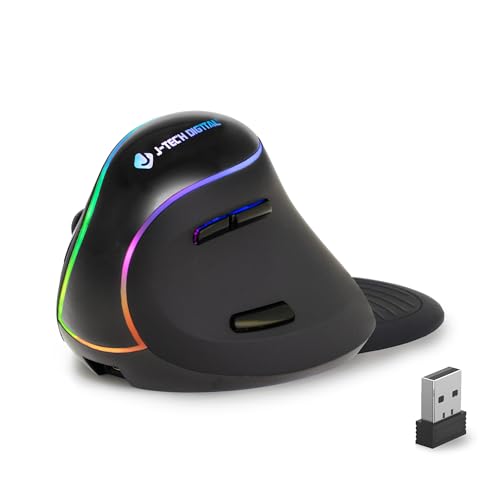
The J-Tech Digital Wireless Ergonomic Mouse is a strong value pick for users who want a vertical mouse with a removable palm rest. The palm rest gives your hand more support during long sessions, while the rechargeable battery and wireless connection keep the setup cleaner than a wired option. It is a good replacement for older budget ergonomic mice if you want comfort features without a premium price.
Pros
-
Removable palm rest adds extra hand support
-
Rechargeable battery keeps the setup simple
-
Thumb buttons are useful for browsing and office work
Cons
-
800 DPI may feel limited for users who prefer faster tracking
-
Palm rest adds desk footprint compared with compact mice
Who should buy it: Choose this if you want a budget-friendly wireless ergonomic mouse with extra palm support.
5. LEKVEY Vertical Wireless Mouse
The LEKVEY Vertical Wireless Mouse remains one of the best value vertical mice because it offers a rechargeable battery, six-button layout, and three DPI levels at a reasonable price. It is simple, practical, and easy to recommend for people who want to try a vertical mouse without spending much. The shape works best for everyday browsing, office work, spreadsheets, and general laptop or desktop use.

Pros
-
Rechargeable design avoids disposable batteries
-
Three DPI settings help adjust cursor speed
-
Good value for a wireless vertical mouse
Cons
-
Build quality is more basic than premium models
-
Not ideal for precision-heavy design or gaming work
Who should buy it: Choose this if you want an affordable rechargeable vertical mouse for everyday office use.
6. Perixx PERIMICE-713L Left-Handed Vertical Mouse
The Perixx PERIMICE-713L is the best pick for left-handed users, which is important because many vertical mice are designed only for right-handed use. Its wireless design, six-button layout, and medium-size shape make it a practical option for left-handed office workers who want a more ergonomic grip. It is a better fit than trying to force a right-handed vertical mouse into an uncomfortable setup.
No products found.
Pros
-
Designed specifically for left-handed users
-
Wireless setup keeps the desk cleaner
-
Six-button layout adds useful daily controls
Cons
-
Not useful for right-handed users
-
Medium size may not fit every hand perfectly
Who should buy it: Choose this if you are left-handed and want a true vertical mouse designed for your grip.
7. Uineer Wireless Ergonomic Vertical Mouse
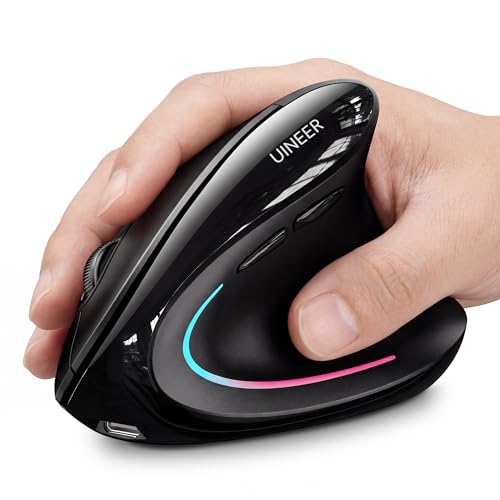
The Uineer Wireless Ergonomic Vertical Mouse is a good extra pick for users who want a modern rechargeable vertical mouse with Bluetooth, 2.4GHz wireless, adjustable DPI, and a battery indicator. It is a practical office mouse for people who switch between devices and want quiet, comfortable daily control. The LED accent is not essential, but the feature set is strong for the price.
Pros
-
Bluetooth and 2.4GHz wireless support multiple setups
-
Rechargeable battery with indicator is convenient
-
Adjustable DPI helps tune cursor speed
Cons
-
LED lighting may not appeal to minimal desk setups
-
Smaller brand than Logitech or Evoluent
Who should buy it: Choose this if you want a rechargeable Bluetooth vertical mouse with a strong feature set for the price.
Quick Comparison
-
ProtoArc EM11 NL: best overall vertical mouse replacement.
-
Logitech Lift: best for small to medium hands.
-
Evoluent VerticalMouse: best classic wired ergonomic mouse.
-
J-Tech Digital Wireless Ergonomic Mouse: best budget mouse with palm support.
-
LEKVEY Vertical Wireless Mouse: best simple rechargeable value pick.
-
Perixx PERIMICE-713L: best left-handed vertical mouse.
-
Uineer Wireless Ergonomic Vertical Mouse: best feature-packed budget vertical mouse.
Final Verdict
The ProtoArc EM11 NL is the best overall pick because it combines a true vertical shape, rechargeable USB-C battery, and multi-device wireless connectivity at a reasonable price. The Logitech Lift is better for smaller hands, while the Evoluent VerticalMouse is best for users who prefer a classic wired ergonomic setup. Choose the J-Tech Digital if you want a palm rest, the LEKVEY if you want simple rechargeable value, the Perixx if you need a left-handed vertical mouse, and the Uineer if you want Bluetooth, adjustable DPI, and rechargeable convenience in a budget-friendly package.
As an Amazon Associate, I earn from qualifying purchases.