
Best Wireless Mouse for Gaming
As an Amazon Associate, I earn from qualifying purchases. Some links may earn us a commission at no extra cost to you.
Wireless gaming mice now cover everything from ultralight competitive FPS designs to multi-button MMO models and inexpensive everyday options. The right choice depends less on chasing the highest DPI number and more on shape, weight, button layout, wireless mode, polling rate, and how you actually grip the mouse.
These seven picks cover competitive shooters, smaller hands, multi-button gaming, high-spec tri-mode setups, budget gaming, ambidextrous use, and gaming-plus-productivity.
Top Picks
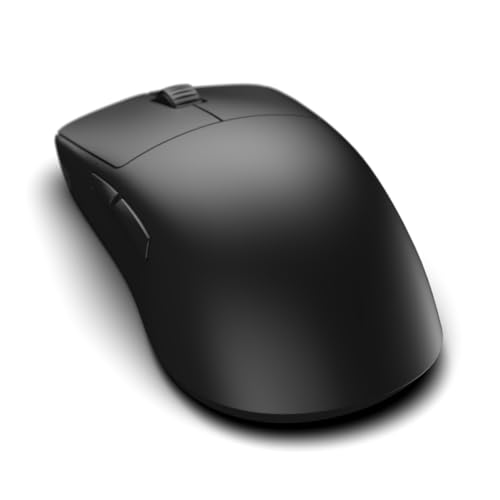
ENDGAME GEAR OP1w 4K v2 — Best for Competitive FPS
The ENDGAME GEAR OP1w 4K v2 is the strongest fit here for players who primarily care about competitive shooters.
Its supplied listing specifies a 30,000 DPI sensor, 4,000Hz wireless polling, hot-swappable switches, and a claw-grip-oriented shape. It keeps the focus on tracking and responsiveness rather than RGB or a large button array.
Why it wins: Its combination of a high-end sensor, 4K wireless polling, and esports-focused claw-grip design makes it the most specialized FPS option in the lineup.
Pros
- 30,000 DPI sensor
- 4,000Hz polling support
- Lightweight esports-oriented design
- Hot-swappable switches
- Designed around claw grip
Cons
- Premium price
- Specialized shape may not suit palm-grip users
- Fewer extra controls than MMO-focused mice
Trade-offs / Who should skip: Choose this when competitive FPS performance matters more than extra buttons or Bluetooth convenience. Mixed-genre players may prefer the Keychron M7 or GLORIOUS Model I 2.
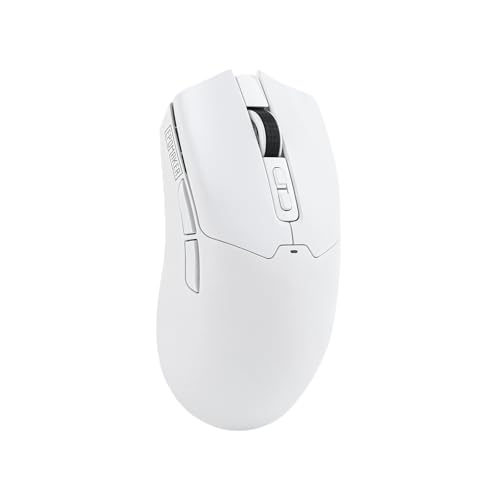
EPOMAKER Click Wireless Gaming Mouse — Best High-Spec Tri-Mode Pick
The EPOMAKER Click offers an unusually aggressive specification set for a more moderately priced wireless gaming mouse.
Its listing includes adjustable sensitivity up to 42,000 DPI, an 8,000Hz polling rate, a 500mAh battery, and 2.4GHz, Bluetooth, and USB-C wired connectivity.
Why it wins: It combines 8K polling with three connection modes and a high DPI ceiling without moving into flagship-mouse pricing.
Pros
- Up to 42,000 DPI
- 8,000Hz polling support
- 2.4GHz, Bluetooth, and USB-C modes
- 500mAh battery
- Lightweight optical design
Cons
- Smaller customer review history than established gaming brands
- Maximum polling performance may be unnecessary for casual gaming
Trade-offs / Who should skip: This is a strong fit for spec-focused buyers who want flexibility. Players who prefer a more established esports-oriented design may be happier with ENDGAME GEAR.
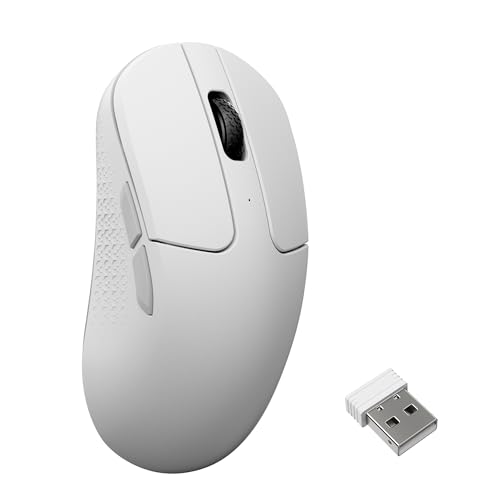
Keychron M3 Mini 8K — Best for Small to Medium Hands
The Keychron M3 Mini 8K remains one of the better choices for players who want a compact and lightweight shape.
It weighs around 55g, uses a PixArt 3950 sensor with up to 30,000 DPI, and supports Bluetooth 5.3, 2.4GHz wireless, and wired USB-C operation.
Why it wins: Its smaller 55g body combines serious gaming specifications with a shape that makes more sense for smaller hands, claw grip, and fingertip grip.
Pros
- Approximately 55g
- PixArt 3950 sensor
- Up to 30,000 DPI
- Tri-mode connectivity
- Up to 140 hours of listed battery life
Cons
- Mini shape may be uncomfortable for large hands
- Less established in competitive esports than some specialist brands
Trade-offs / Who should skip: Large-handed palm-grip users should consider the Keychron M7 or another larger ergonomic design instead.
GLORIOUS Model I 2 Wireless — Best for Extra Buttons
The GLORIOUS Model I 2 Wireless targets players who want more controls without committing to an extremely heavy MMO mouse.
It combines a 75g ergonomic body with nine buttons, including two swappable buttons, plus 2.4GHz wireless and Bluetooth connectivity.
Why it wins: Nine buttons give MMO, MOBA, battle royale, and productivity users more flexibility while the 75g weight remains manageable for mixed gaming.


Pros
- Nine-button layout
- Two swappable buttons
- 75g design
- 2.4GHz and Bluetooth connectivity
- Side thumb rest
Cons
- Heavier than dedicated FPS mice
- Ergonomic shape will not suit every grip
- More buttons than pure FPS players need
Trade-offs / Who should skip: Competitive shooter players who prioritize minimum weight should look at ENDGAME GEAR or the Keychron M3 Mini instead.
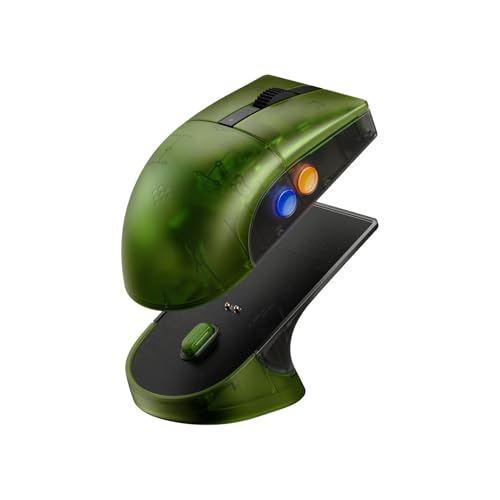
8BitDo Retro R8 Xbox Edition — Best with a Charging Dock
The 8BitDo Retro R8 stands out by combining gaming-focused hardware with a distinctive retro design and included charging-dock setup.
Its supplied listing specifies a PAW3395 optical sensor, sensitivity up to 26,000 DPI, 4,000Hz polling, programmable buttons, Kailh GM X switches, and an ambidextrous shape.
Why it wins: It offers a useful mix of a charging dock, 4K polling, a proven sensor platform, and an ambidextrous design.
Pros
- PAW3395 optical sensor
- Up to 26,000 DPI
- 4,000Hz polling
- Charging dock included
- Ambidextrous shape
Cons
- Retro styling will not appeal to everyone
- Less specialized for ultralight FPS play than ENDGAME GEAR
Trade-offs / Who should skip: Pick this if charging convenience and ambidextrous design matter. Buyers chasing the lightest possible competitive mouse should choose a more FPS-focused model.
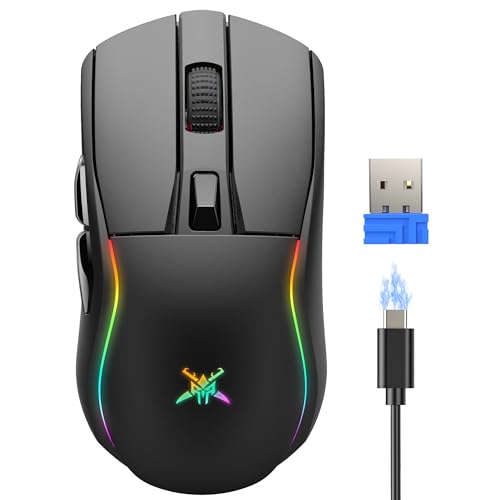
TECKNET 24K Tri-Mode Wireless Gaming Mouse — Best Budget Pick
The TECKNET wireless gaming mouse is the value-focused option for players who want modern gaming features without spending heavily.
Its listing includes up to 24,000 DPI, a 1,000Hz polling rate, six programmable buttons, six RGB modes, and tri-mode connectivity for gaming and everyday computer use.
Why it wins: It delivers programmable controls, high sensitivity, RGB, and multiple connection options at a much lower price than the enthusiast models.
Pros
- Up to 24,000 DPI
- 1,000Hz polling
- Six programmable buttons
- Six RGB modes
- Works with PC, laptop, and Mac
Cons
- 1,000Hz polling is below the high-end 4K and 8K models
- Plastic construction is more basic than premium mice
Trade-offs / Who should skip: Serious competitive players may benefit from the higher polling and more specialized designs above. For casual gaming and general use, the TECKNET offers a more economical balance.
Keychron M7 Wireless Mouse — Best for Gaming and Productivity
The Keychron M7 remains the most versatile option when the same mouse needs to handle games, work, school, and everyday browsing.
Its 63g ergonomic design includes a 26,000 DPI optical sensor, 2.4GHz wireless, Bluetooth, wired USB-C connectivity, macro support, and up to 70 hours of listed work time.
Why it wins: It balances relatively low weight and gaming-grade specifications with an ergonomic shape and connection flexibility suited to everyday computer use.

Pros
- 63g body
- 26,000 DPI sensor
- 2.4GHz, Bluetooth, and wired modes
- Ergonomic thumb-rest design
- Useful for gaming and productivity
Cons
- Not as specialized as a dedicated esports mouse
- Shape may feel wide for very small hands
Trade-offs / Who should skip: Competitive FPS players should prioritize ENDGAME GEAR or the M3 Mini. The M7 makes more sense when one mouse needs to do several jobs well.
Quick Compare
- ENDGAME GEAR OP1w 4K v2: best for competitive FPS.
- EPOMAKER Click: best high-spec tri-mode option.
- Keychron M3 Mini 8K: best for small to medium hands.
- GLORIOUS Model I 2 Wireless: best for extra buttons and mixed genres.
- 8BitDo Retro R8: best with a charging dock and ambidextrous shape.
- TECKNET 24K: best budget wireless gaming mouse.
- Keychron M7: best gaming and productivity hybrid.
Final Verdict
The ENDGAME GEAR OP1w 4K v2 is the most focused option for competitive FPS players, while the EPOMAKER Click makes sense for buyers who want 8K polling and tri-mode connectivity at a lower price.
Choose the Keychron M3 Mini 8K for a compact lightweight shape, the GLORIOUS Model I 2 when extra buttons matter, or the 8BitDo Retro R8 if an ambidextrous shape and charging dock appeal to you.
For tighter budgets, the TECKNET 24K covers the essentials well, while the Keychron M7 remains the most practical option for people who want one wireless mouse for both gaming and everyday work.
As an Amazon Associate, I earn from qualifying purchases.